# LakeQuality knowledge base
The whole LakeQuality help center in one file, for support agents and offline reading. Web version: https://www.lakequality.org/help. Updated 2026-11-20. Support: hello@lakequality.org.
## Facts
- LakeQuality for iPhone (bundle org.lakequality.app) is the iPhone app for lakequality.org from ColdPress LLC: clarity map on Apple Maps, lake sheets, saved lakes, alerts, a private journal and AI answers grounded in each lake's record (Anthropic).
- Version 2.0.1 (build 42) is in App Review (rejected Nov 2026, being fixed); not on the App Store yet.
- Free: readings, algae flags, map, search, saved lakes, lake sheet, places to stay (Stay22), journal, alerts. LakeQuality Plus: $24.99/year with a 7-day trial for eligible accounts, $3.99/month (both with Family Sharing), or $59.99 lifetime; raises AI allowances and adds radar, offline regions, full fishing rankings, season recap, PDF report, widgets.
- Purchases: Apple in-app purchase through Superwall. Restore and offer codes on the plans screen; cancel in iPhone Settings > your name > Subscriptions; refunds at reportaproblem.apple.com.
- Account optional: Sign in with Apple or Google; it subscribes the email to the weekly updates (unsubscribe any time). Delete in Account > Delete account.
- Support: hello@lakequality.org. Privacy: https://www.lakequality.org/privacy-policy.
## Contents
- Start here: [LakeQuality for iPhone at a glance](#overview), [Getting started](#getting-started)
- How-to guides: [The map and the lake sheet](#map-and-lake-sheet), [Saved lakes, alerts and the journal](#saved-alerts-journal), [Search, the lake concierge and fishing rankings](#search-and-fishing), [Lake radar, offline regions and widgets](#plus-features)
- Account and billing: [LakeQuality Plus and billing](#subscription), [Your account: sign in, sign out, delete](#account)
- Privacy and data: [Privacy and your data](#privacy)
- Troubleshooting: [Troubleshooting](#troubleshooting)
- FAQ: [LakeQuality questions and answers](#faq)
- Support desk (rules for the support email agent, not on the website): [Rules for answering LakeQuality app support email](#support-desk-rules)
---
## LakeQuality for iPhone at a glance
Start here · https://www.lakequality.org/help/overview · updated 2026-11-20
What the LakeQuality iPhone app does, what is free, what LakeQuality Plus costs, how the free trial and Apple payments work, and accounts.
### What it does
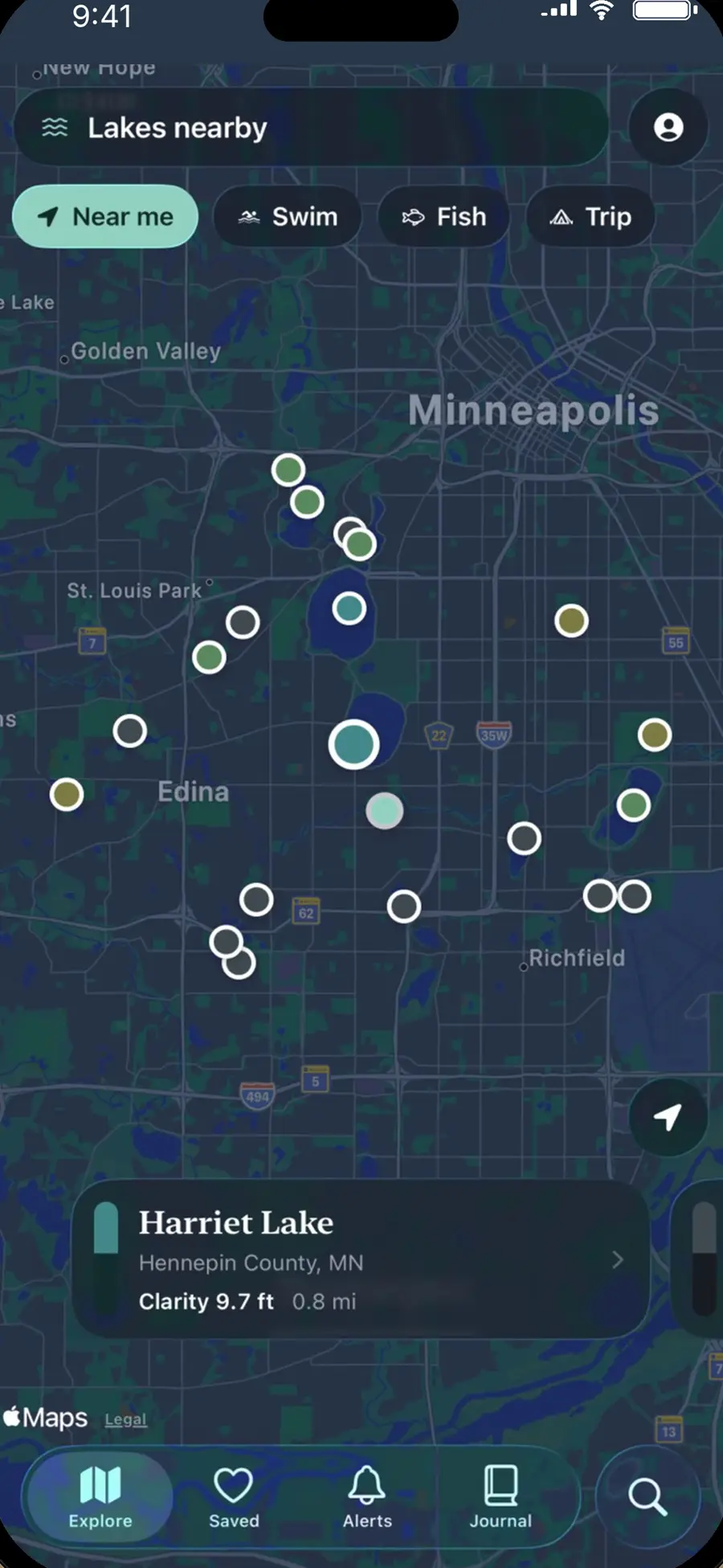
LakeQuality for iPhone puts lakequality.org's lake records on your phone: lakes near you on Apple Maps colored by water clarity, each lake's readings (clarity, phosphorus, chlorophyll-a, satellite algae, depth, ice-out, fish surveyed), saved lakes, alerts when a saved lake gets a new reading or an algae flag, a private lake journal, and AI help that answers only from each lake's own record.
### Who it's for
Swimmers, anglers, boaters, cabin owners and anyone choosing a lake in the United States.
### Where it runs
| Question | Answer |
| --- | --- |
| iPhone | Yes, from the App Store as LakeQuality (version 2). |
| iPad, Android | No app. |
| Web | [lakequality.org](https://www.lakequality.org) has every lake page, and your account works on both. |
### What it costs
| Plan | Price |
| --- | --- |
| LakeQuality | Free: every reading, algae flags, the map, search, saved lakes, the lake sheet, places to stay, the journal and alerts |
| LakeQuality Plus, yearly | $24.99 a year, with a 7-day free trial |
| LakeQuality Plus, monthly | $3.99 a month |
| LakeQuality Plus, lifetime | $59.99 once |
Plus raises the monthly AI allowances and adds lake radar, offline regions, the full fishing rankings, the season recap, the lake report PDF and widgets. See [LakeQuality Plus and billing](https://www.lakequality.org/help/subscription).
### How paying works
Plus is sold through the App Store and charged to your Apple Account. The plans screen opens from Account → LakeQuality Plus or from any Plus feature; Apple's sheet confirms the price. The yearly plan's 7-day trial is Apple's, offered to eligible accounts; cancel at least 24 hours before it ends or $24.99 is charged. Subscriptions renew until you cancel in iPhone **Settings → your name → Subscriptions**. Apple handles refunds.
### Do I need an account?
No. Everything free works without one. Signing in with Apple or Google keeps the same saved lakes on lakequality.org and turns on alerts. See [Your account](https://www.lakequality.org/help/account).
### Where to go next
- [Getting started](https://www.lakequality.org/help/getting-started)
- [The map and the lake sheet](https://www.lakequality.org/help/map-and-lake-sheet)
- [Troubleshooting](https://www.lakequality.org/help/troubleshooting)
---
## Getting started
Start here · https://www.lakequality.org/help/getting-started · updated 2026-11-20
Install LakeQuality, go through the welcome, allow your location if you like, and find, open and save your first lake.
### Install
1. On your iPhone, open the App Store and search for **LakeQuality**.
2. Tap **Get**. It's free.
3. The first time you open it, the welcome screen says what the app is and asks about your location.
### The tabs
| Tab | What it's for |
| --- | --- |
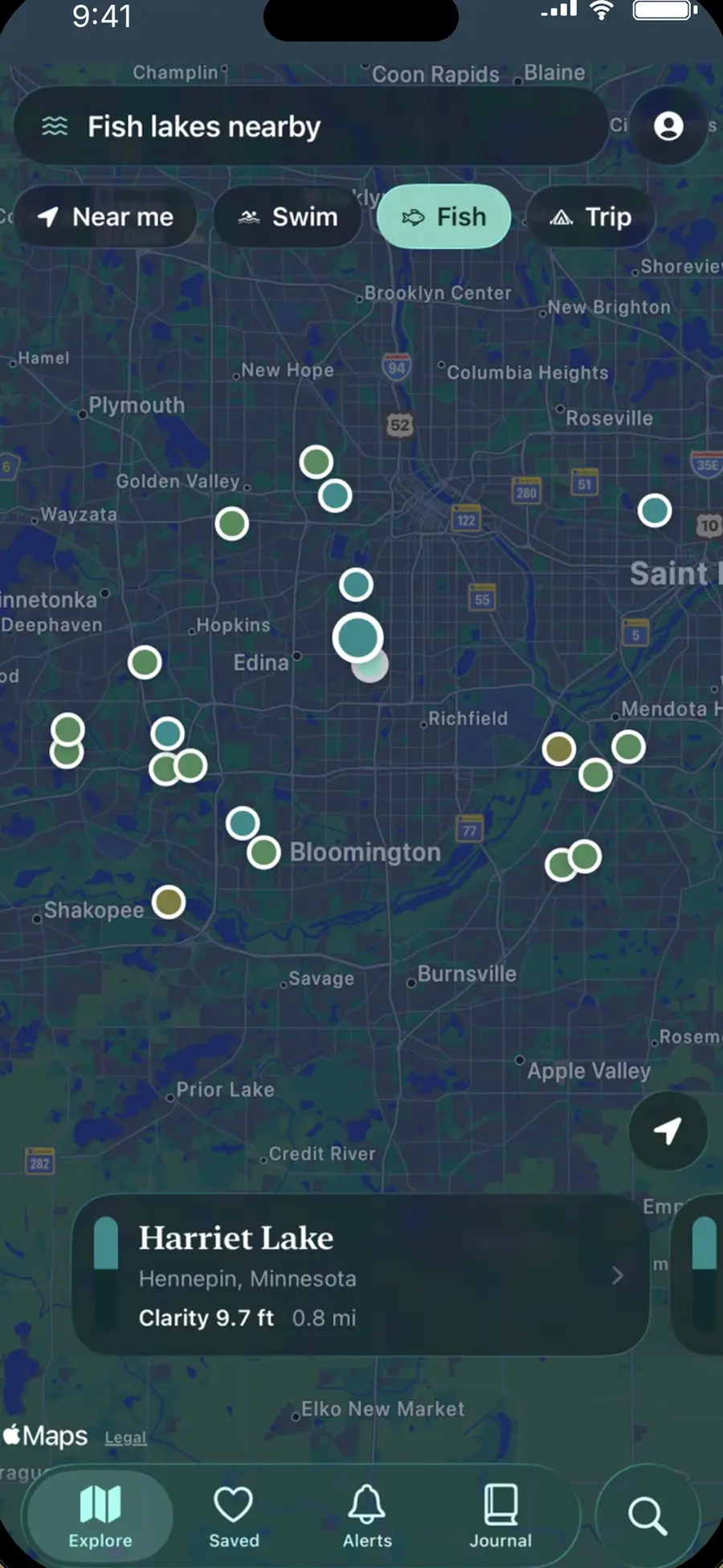
| **Explore** | Apple Maps around you. Pins are colored by each lake's clarity reading. **Near me**, **Swim**, **Fish** and **Trip** presets; cards along the bottom follow the pins. |
| **Saved** | Your lakes, newest first. They open without a signal. |
| **Alerts** | Push alerts for saved lakes. |
| **Journal** | Your days on the water: lake, day, note, catch and photo, kept on this iPhone. |
| **Search** | The magnifying glass: name, town or ZIP, presets, recent searches, the lake concierge and fishing rankings. |
### Find and save a lake
1. On **Explore**, tap **Near me** or move the map.
2. Tap a pin or a card to open the lake sheet.
3. Tap **Saved** on the sheet to save it.
### Permissions and why
| Permission | Why |
| --- | --- |
| Location (While Using) | "To show the lakes near you on the map. It is sent only as a search for nearby lakes, rounded to about a kilometre." |
| Notifications | Only if you turn on alerts: new readings and algae flags for your saved lakes. |
| Photos | Only when you choose a photo to add to your lake journal. |
| Camera | Only when you take a photo for your journal. |
LakeQuality never asks for the microphone, motion data or tracking.
---
## The map and the lake sheet
How-to guides · https://www.lakequality.org/help/map-and-lake-sheet · updated 2026-11-20
Explore lakes on Apple Maps, use the Swim, Fish and Trip presets, and read a lake sheet: clarity, phosphorus, chlorophyll-a, algae, depth and more.
### Explore
1. Open **Explore**. Each pin is a lake, colored by its clarity reading.
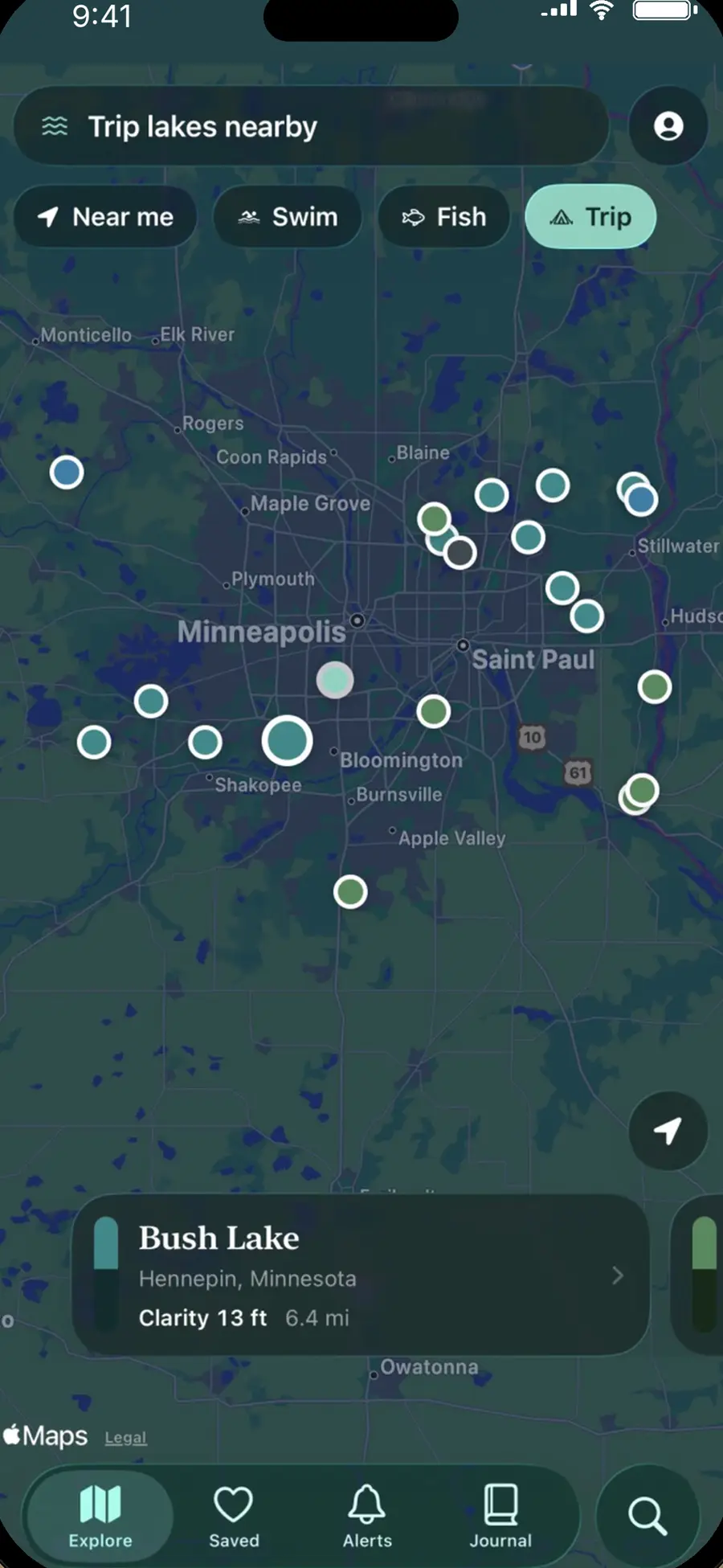
2. Tap **Near me**, **Swim**, **Fish** or **Trip** to change what's shown and how it's ranked.
3. Cards along the bottom follow the pins in view. Move the map and tap **Search this area** to refresh.
### The lake sheet
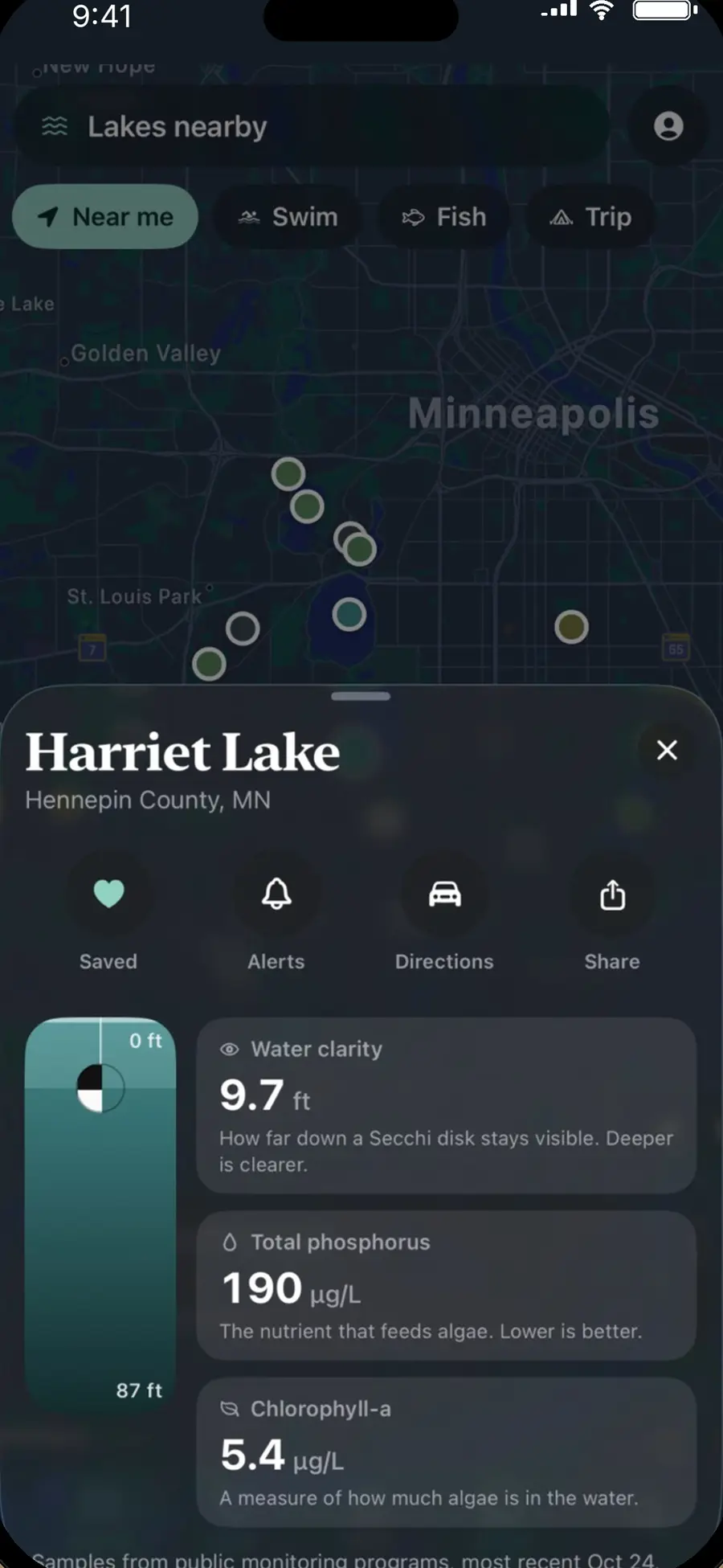
Tap any pin or card. The sheet shows:
- **The water column**: how far down a Secchi disk stays visible at that lake's measured depth.
- **Water clarity**, **Total phosphorus** (the nutrient that feeds algae; lower is better) and **Chlorophyll-a** (a measure of how much algae is in the water), each with what it means.
- Satellite algae, depth, area, trophic state, ice-out and fish surveyed, where there are records.
- **Saved**, **Alerts**, **Directions** and **Share** at the top.
- **Ask about this lake**, places to stay, and the full report on lakequality.org.
"No reading" means there's no measurement for that item. LakeQuality doesn't guess, and readings come from public monitoring programs with the date of the most recent sample.
### Ask about this lake (AI)
Type a question on the lake sheet. An AI model from Anthropic answers only from that lake's own record; if the record doesn't say, it says so instead of guessing. Questions about places to stay go to the places-to-stay list. Every answer has a **Report** link. Free includes 10 questions a month; Plus includes 300.
### History and "Better or worse?"
**History** on the lake sheet charts each year's readings. **Better or worse?** explains the trend in plain words (AI; 1 a month free, 100 with Plus). With Plus you can share a lake report as a PDF.
### Plan a trip
**Plan a trip** on the lake sheet: pick dates and activities, and get a one-page brief (water, algae, fishing, weather, access, places to stay) you can share as text. AI; 1 a month free, 60 with Plus.
### Places to stay
Places to stay are Stay22's listings, labelled as such, below the readings. Totals are for the nights you choose.
---
## Saved lakes, alerts and the journal
How-to guides · https://www.lakequality.org/help/saved-alerts-journal · updated 2026-11-20
Save lakes, get alerts for new readings and algae flags, and keep a private lake journal with notes, catches and photos.
### Saved
Tap **Saved** on a lake sheet. The **Saved** tab lists your lakes, newest first, and they open without a signal from the copy kept on your phone. Signed in, it's the same list as on lakequality.org.
### Alerts
1. Sign in (Account, the person button on Explore). Alerts need an account.
2. Open **Alerts** and turn alerts on for this iPhone, then allow notifications.
3. Choose **new readings** and **algae** alerts.
4. Tap **Send a test alert** to check it works.
Alerts cover your saved lakes. Once LakeQuality Plus is on sale, free alerts cover your first three saved lakes and Plus covers all of them.
### The journal
The **Journal** tab keeps your days on the water on this iPhone only: lake, day, note, catch and a photo.
1. Add a day from the Journal tab.
2. Pick the lake and day, write a note, add your catch and a photo if you like.
3. **Check this photo** describes the surface, sky, water color and any algae seen, or the fish (AI; 1 a month free, 60 with Plus).
4. With Plus, **Recap my season** writes a short recap of your season.
Journal entries never leave your phone, except a photo or note you send to a check or recap, which isn't stored after the answer is written.
---
## Search, the lake concierge and fishing rankings
How-to guides · https://www.lakequality.org/help/search-and-fishing · updated 2026-11-20
Find a lake by name, town or ZIP, describe the lake you want to the AI concierge, and see fishing rankings from DNR surveys.
### Search
Tap the magnifying glass. Type a lake name, town or ZIP; results appear as you type. Presets around you, recent searches and lakes you opened lately are there too.
### Describe the lake you want
**Describe the lake you want** (the lake concierge) takes a plain description, like "a clear swimming lake within 30 minutes with a beach", and suggests lakes from the records. AI; 3 a month free, 100 with Plus.
### Fishing rankings
**Fishing rankings** ranks lakes by DNR survey catch rates in Minnesota and Wisconsin. Free shows the top 3 of each list; Plus shows the full list.
---
## Lake radar, offline regions and widgets
How-to guides · https://www.lakequality.org/help/plus-features · updated 2026-11-20
The LakeQuality Plus features: alerts for lakes around a place, lake cards saved for offline use, and Home Screen and Lock Screen widgets.
These are part of LakeQuality Plus. Open them from **Account → LakeQuality Plus**.
### Lake radar
Alerts for every lake around a place, not only saved ones. Pick a place and a radius (10, 25 or 50 miles), then choose algae flags, new readings or both. Needs Plus and an account.
### Offline regions
Save every lake card within 25, 50 or 100 miles of a place on your phone, for cabins and boat launches without a signal. Up to three regions.
### Widgets
Home Screen (small, medium) and Lock Screen widgets show your first saved lakes. Touch and hold the Home Screen or Lock Screen, tap **Edit** or **Customize**, and add LakeQuality. Widgets are free until Plus goes on sale, then part of Plus.
---
## LakeQuality Plus and billing
Account and billing · https://www.lakequality.org/help/subscription · updated 2026-11-20
What Plus adds, $24.99 a year with a 7-day trial, $3.99 a month or $59.99 once, and how to subscribe, restore, redeem a code, cancel and get a refund.
### Free and Plus
| Feature | Free | Plus |
| --- | --- | --- |
| Readings, algae flags, map, search, saved lakes, places to stay, journal | Yes | Yes |
| Ask about this lake (AI) | 10 a month | 300 a month |
| Lake concierge (AI) | 3 a month | 100 a month |
| Trip brief (AI) | 1 a month | 60 a month |
| Better or worse? (AI) | 1 a month | 100 a month |
| Photo check (AI) | 1 a month | 60 a month |
| Season recap (AI) | No | 12 a month |
| Lake report PDF | No | Yes |
| Fishing rankings | Top 3 per list | Full list |
| Lake radar, offline regions | No | Yes |
| Widgets | Free until Plus goes on sale | Yes |
Allowances reset each month. Nothing that's free today becomes paid.
### Prices
- **Yearly**: $24.99 a year, with a 7-day free trial for eligible Apple Accounts.
- **Monthly**: $3.99 a month.
- **Lifetime**: $59.99 once, Plus for good.
Yearly and monthly include Family Sharing. Prices are in US dollars; Apple shows your local price.
### Subscribe
1. Open **Account → LakeQuality Plus**, or tap any Plus feature.
2. Pick a plan and confirm on Apple's sheet.
The yearly trial is Apple's: cancel at least 24 hours before the 7 days end, or $24.99 is charged and it renews every year.
### Restore, offer codes and managing
- **Restore**: on the plans screen, signed in to the App Store with the Apple Account that paid.
- **Offer codes** (from a lake association or resort): redeem on the plans screen, or at apps.apple.com/redeem.
- **Manage subscription**: on the plans screen, or iPhone **Settings → your name → Subscriptions → LakeQuality**, to switch plans or cancel. You keep Plus until the end of the period. Deleting the app doesn't cancel it.
### Refunds
Apple handles App Store payments. Request a refund at [reportaproblem.apple.com](https://reportaproblem.apple.com) with the Apple Account that paid.
---
## Your account: sign in, sign out, delete
Account and billing · https://www.lakequality.org/help/account · updated 2026-11-20
Why you might sign in, Apple and Google sign-in, the weekly email, signing out, deleting your account, and getting a copy of your data.
### Do you need one?
No. Readings, the map, search, saved lakes, the journal and places to stay work without an account. Sign in to keep the same saved lakes on lakequality.org and to get alerts.
### Sign in
Open **Account** (the person button on Explore) and choose **Sign in with Apple** or **Google**. Saved then shows the same list as your lakequality.org account.
Creating an account also subscribes your email to LakeQuality's regular updates. Every email has an unsubscribe link, and **Account → Notes, trip dates, and the weekly email** turns them off without deleting the account.
### Sign out
**Account → Sign out**. Your saved lakes stay on lakequality.org; sign in again on any iPhone to get them back. The journal stays on this phone.
### Delete your account
**Account → Delete account** and confirm. This deletes your account and what it holds on our servers (email, saved lakes, notes, trip dates, alerts). It doesn't cancel a Plus subscription: cancel that in iPhone Settings → your name → Subscriptions. Your journal stays on your phone until you delete the app.
### Get a copy of your data or change your email
There's no export button. Email hello@lakequality.org from the address on your account.
---
## Privacy and your data
Privacy and data · https://www.lakequality.org/help/privacy · updated 2026-11-20
What stays on your iPhone, what an account keeps, how location and AI requests are handled, and the services that handle data.
### Where each kind of data lives
| Data | Where it's kept |
| --- | --- |
| Lake journal (notes, catches, photos) | This iPhone only |
| Saved lakes (no account) | This iPhone only |
| Your location | Sent only as a search for nearby lakes, rounded to about a kilometre, and not kept |
| Account (if you sign in) | Your email, a sign-in identifier, your display name if the provider gives one, and what you save: lakes, notes, trip dates, region, interests and email preferences |
| AI questions, notes and photos | Sent to Anthropic to write the answer, not saved on our servers afterwards; only a monthly count is kept for the allowances |
| Plus | Apple takes payment. Superwall confirms whether Plus is active, using your account id or a random device id. |
### Services
| Service | What it does |
| --- | --- |
| Apple | App Store, payments, Sign in with Apple, push alerts |
| Google | Only if you sign in with Google: confirms your email, nothing more |
| Anthropic | Writes AI answers from the lake records |
| Superwall | Plus purchases and whether Plus is active |
| Stay22 | Places to stay listings |
| An email delivery provider | The weekly email, if you have an account |
### What it never does
No display ads, no ads SDK, no tracking prompt and no tracking across other companies' apps. AI answers come only from the public lake records and weather we send; they can be wrong, and every answer has a Report link.
### The full policy
The [privacy policy](https://www.lakequality.org/privacy-policy) covers the website, accounts and the AI features. Questions: hello@lakequality.org.
---
## Troubleshooting
Troubleshooting · https://www.lakequality.org/help/troubleshooting · updated 2026-11-20
Fixes for Near me, alerts that don't come, AI limits, Plus not unlocking, saved lakes after signing in, and "No connection".
### Near me doesn't work
Allow location: iPhone **Settings → LakeQuality → Location → While Using the App**, and check Location Services is on.
### "No connection"
LakeQuality reads lake records from lakequality.org. Saved lakes open offline; everything else needs a signal. With Plus, save an offline region before you go.
### Alerts don't come
1. Sign in; alerts need an account.
2. **Alerts**: alerts on for this iPhone, and new readings or algae turned on.
3. iPhone **Settings → Notifications → LakeQuality**: Allow Notifications.
4. Tap **Send a test alert**.
5. Alerts are for new readings and algae flags, which don't happen every week.
### "You've used this month's answers"
The free AI allowances reset each month. Plus raises them; see [LakeQuality Plus and billing](https://www.lakequality.org/help/subscription).
### I paid but Plus isn't on
Restore on the plans screen with the Apple Account that paid. With Ask to Buy, Plus starts after approval. Close and reopen the app.
### My saved lakes changed after signing in
Signed in, Saved shows your lakequality.org list. Sign in with the same Apple or Google account you use on the website.
### A reading looks wrong or old
Readings come from public monitoring programs; the sheet shows the most recent sample date. Use **Report** on an AI answer, or email hello@lakequality.org with the lake's name and county.
### Something else
Update LakeQuality from the App Store and reopen it. Then email hello@lakequality.org with your iPhone model, iOS version and what you tapped.
---
## LakeQuality questions and answers
FAQ · https://www.lakequality.org/help/faq · updated 2026-11-20
Straight answers to what people ask most about the LakeQuality iPhone app: readings, saving, alerts, AI, Plus, cancelling, refunds and privacy.
### About the app
#### What is LakeQuality for iPhone?
The lakequality.org lake records on your phone: a clarity map, each lake's readings, saved lakes, alerts, a journal and AI help from each lake's record. See [LakeQuality at a glance](https://www.lakequality.org/help/overview).
#### Is it free?
Yes. Every reading, the map, search, saved lakes, places to stay and the journal are free. LakeQuality Plus adds more AI answers, radar, offline regions, full fishing rankings and more.
#### Do I need an account?
No. Sign in only to keep the same saved lakes on the website and get alerts.
#### Is there an Android or iPad app?
No. lakequality.org works in any browser.
#### Where do the readings come from?
Public monitoring programs: the EPA Water Quality Portal and state DNR datasets, with satellite algae where available.
#### Does a clear lake mean it's safe to swim?
Not on its own. Readings describe past samples. Check posted advisories and algae warnings at the lake before you swim.
#### What does "No reading" mean?
There's no measurement for that item. LakeQuality never fills a gap with a guess.
### Using it
#### How do I find lakes near me?
Open Explore and tap Near me. Allow your location while using the app.
#### How do I save a lake?
Open the lake sheet and tap Saved.
#### How do I get alerts for a lake?
Sign in, save the lake, then turn on alerts in the Alerts tab. See [Saved lakes, alerts and the journal](https://www.lakequality.org/help/saved-alerts-journal).
#### Is my journal private?
Yes. It stays on your iPhone.
#### How does Ask about this lake work?
An AI model answers only from that lake's record and says when the record doesn't cover it. Every answer has a Report link.
#### Can it plan a trip?
Yes. Plan a trip on the lake sheet gives a one-page brief you can share.
#### Does it work without a signal?
Saved lakes open offline. With Plus, save offline regions.
#### Which states have fishing rankings?
Minnesota and Wisconsin, from DNR survey catch rates.
### Plus and billing
#### How much is Plus?
$24.99 a year with a 7-day free trial, $3.99 a month, or $59.99 once.
#### Will I be charged when the trial ends?
Yes, unless you cancel at least 24 hours before the 7 days end.
#### How do I cancel?
iPhone Settings → your name → Subscriptions → LakeQuality → Cancel Subscription.
#### Can I get a refund?
Apple handles App Store payments: reportaproblem.apple.com with the Apple Account that paid.
#### Can my family share Plus?
Yes, yearly and monthly include Family Sharing.
#### I have an offer code. Where do I enter it?
On the plans screen, or at apps.apple.com/redeem.
#### I got a new iPhone. Do I pay again?
No. Restore on the plans screen with the same Apple Account.
### Account and privacy
#### How do I delete my account?
Account → Delete account. It doesn't cancel Plus; cancel that in your Apple subscriptions.
#### Why am I getting emails?
Creating an account subscribes you to LakeQuality's updates. Unsubscribe from any email, or turn them off in Account.
#### Does LakeQuality track my location?
Only as a search for nearby lakes, rounded to about a kilometre, and it isn't kept.
### Getting help
#### How do I contact support?
Account → Contact, or email hello@lakequality.org.
---
## Rules for answering LakeQuality app support email
Support desk · not a web page · updated 2026-11-20
What the support email agent may answer about the LakeQuality iPhone app, what goes to the owner, and how replies sound.
### Who is writing
Replies go from hello@lakequality.org and end with "LakeQuality" on its own line. Website-only questions (lake pages, corrections, ads) follow the LakeQuality site's own rules. Never claim to be a person.
### Answer on your own
- How-to questions from this knowledge base, with one article link.
- Prices: free core; Plus $24.99 a year with a 7-day trial for eligible accounts, $3.99 a month, $59.99 lifetime; Family Sharing on yearly and monthly.
- Charges, restore, offer codes, cancelling in Apple's Subscriptions, and that Apple decides refunds at reportaproblem.apple.com. Never promise a refund.
- What a reading means and where it comes from; that readings are past samples, not a swim clearance.
- Bug reports and data corrections: thank them, ask for the lake name and county, iPhone model and iOS version.
### Hand to the owner (hold as a draft)
- Account deletion done for them, email changes, data copies, any privacy or legal request.
- Safety in the moment (algae, a sick pet or person after swimming): tell them to contact local health authorities or a vet now, and hold the thread.
- Anger, chargebacks, press, partnerships, lake associations or resorts asking for offer codes.
- Anything the knowledge base doesn't answer.
### Never
- Say a lake is safe to swim in.
- Name the AI model beyond "an AI model from Anthropic", as the privacy policy says.
- Ask for passwords or payment details.
### How replies sound
Plain, two to four sentences, "Hi ," or "Hi,". Answer first, then the step. No "Great question", "I hope this helps", no em dashes.
### Facts that change
- Version 2.0.1 (build 42) was rejected by App Review and is being fixed; it isn't on the App Store yet. Until it is, point people to lakequality.org.
- Plus isn't on sale on the server yet (PLUS_LIVE is off): alerts aren't capped and widgets are free until it is.